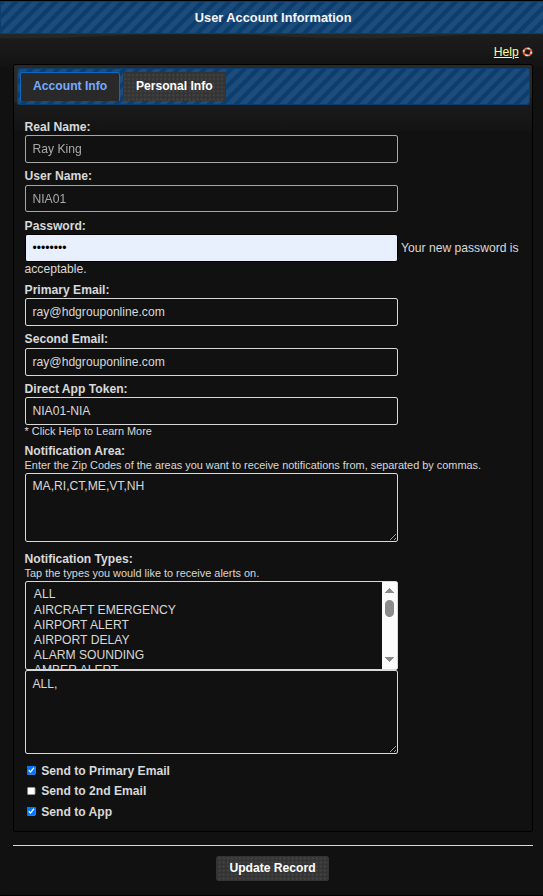
- Real Name: Your Name.
- User Name: This is the name you will use to log in to the system.
- Password: Your password.
- Primary Email: This is the email that alerts can be sent to and communications from the Admin team.
- Second Email: I only for alerts, this is if you want to use a different email.
- Direct App Token: If you are using either the IMAS Android app or the ntfy.sh Android or iOS app you will have to fill this field. It is highly recommended that you use an app for alert notification, not an email. Emails can be rate limited where as the app is not. If you choose to use the IMAS app you need to paste the key generated by the app here. If you use the ntfy.sh app, you will have to create your own. It can only be 22 characters long, and does not have to be cryptic but it does have to be unique. An example would be your login name and the system, like NIM01-NEIMAS. When you install ntfy from the playstore, this key is what you will add as the app topic. You can use the same IMAS key or ntfy key on multiple IMAS systems that you are a member of. Be sure when setting up the ntfy app you choose ntfy.imas.us.com:88 as the server.
- Notification Area: Zipcode or State abbreviation you want to receive alerts from separated by a comma.
- Notification Types: Just click on the notifications you want to receive, the list will be built for you in the text box bellow.
- Personal Info: You can put anything you want in here. I use it for my emergency service contact information.
- Delivery Method: Check the box or boxes of how you want to receive your alerts.